
Home › Jewish Life & Holidays › Jewish Holiday & Shabbat Hosting Command Center
Jewish Holiday & Shabbat Hosting Command Center
Every planner on this page gives you a blank page to write on. This one does the arithmetic.
$17.93 launch price (22% off $22.99) — already applied, through September 24, 2026. Secure checkout by Payhip; your download link appears straight after payment and by email.
Want the Autism Visual Schedule Builder + Independence Tracker too? The Home & Holiday Pack has both for $26.99 — $7.93 less than buying them one by one.
- FormatGoogle Sheets · Microsoft Excel
- DeliveryInstant digital download
- What it isOne .xlsx file · 9 tabs · 10,784 formulas
- CategoryJewish Life & Holidays
Every planner on this page gives you a blank page to write on. This one does the arithmetic.
Two days of Yom Tov running straight into Shabbat means five or six festive meals with no shopping, no supermarket and no second chance in between. The hard part was never remembering what to serve. The hard part is that the recipe serves eight and fourteen people are coming, that the shopping list has to be written twice, and that at half past four on Friday afternoon there are four things that all need the oven and they all want a different temperature.
This is a working spreadsheet. You tell it who is coming and what you are making. It tells you what to buy, what it costs, and what time to start each dish.
YOU CHANGE THE GUEST COUNT IN ONE CELL
- Every recipe carries its own base servings — this one feeds 8, that one feeds 12.
- You type the guest count for each meal, once.
- The workbook works out the batches. Fourteen guests on a recipe that serves eight is 1.75 batches, and every single ingredient is multiplied by 1.75 — all the way through to the shopping list and the dollar figure.
- Someone else calls to say they are coming? Change the one number. Everything downstream moves.
THE SHOPPING LIST WRITES ITSELF
- You never type a shopping list. It is built from your menu, ingredient by ingredient, across every recipe at every meal.
- In the example data in this file, four different recipes call for carrots. The list adds them up and says 18.5 lb — $23.87. Eggs appear in six recipes: 8.545 dozen needed, one dozen already in the fridge, buy 7.545 — $32.37.
- There is an "Already At Home" column. Whatever you already have comes off what you buy, and never off what the recipes need.
- Then the same list again, sorted into the order you walk your own store — you set the departments and the aisle numbers. Produce first, then Deli, then Meat, then the back of the shop. Print it, or open it on your phone at the store.
THE CLOCK RUNS BACKWARDS FROM CANDLE LIGHTING
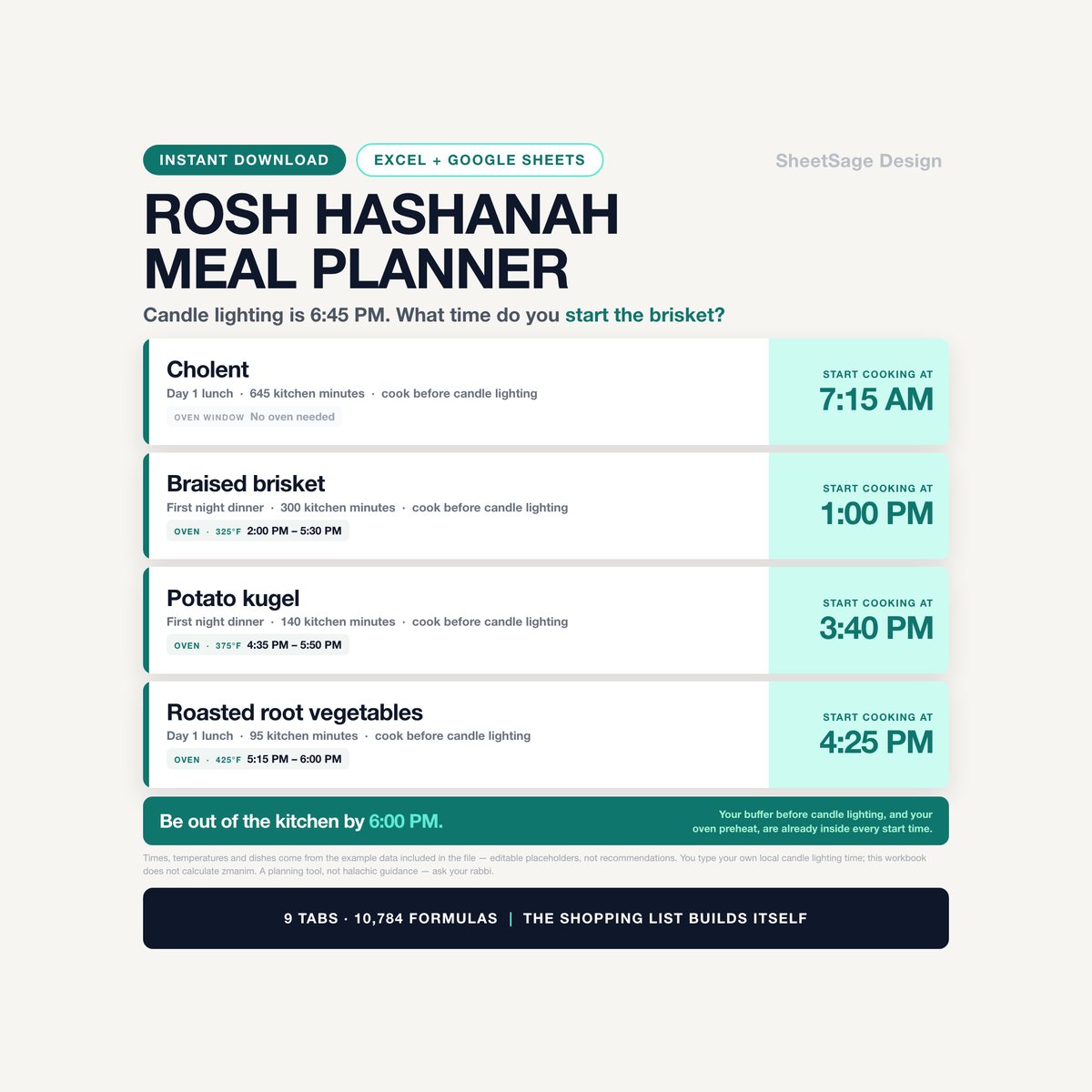
You give it the date and the time. It knows how long each dish takes and which dishes cannot wait. Straight from the example data in this file:
- Cholent — start at 7:15 AM.
- Braised brisket — start at 1:00 PM. In the oven 2:00 PM to 5:30 PM at 325°F.
- Potato kugel — start at 3:40 PM. In the oven 4:35 PM to 5:50 PM at 375°F.
- Roasted root vegetables — start at 4:25 PM. In the oven 5:15 PM to 6:00 PM at 425°F.
- Everything in one list, earliest start first, with your own buffer and your oven preheat already built into every line.
You are not converting minutes in your head any more. You are reading a time.
AND IT CATCHES THE OVEN CLASH
Look at those lines again. 325°F, 375°F and 425°F, all in the same window — and a roast chicken at 400°F sitting right on top of them. That is not a hypothetical: it is what the example menu actually does, and the workbook says so, in words, on the row:
OVEN CLASH - 4 other dishes need the oven at a different temperature in this window
A printable planner has no way to tell you that. It is the mistake that ruins the timing every single year, and you now find it on a Tuesday instead of at 4:30 on Friday.
BUILT FOR TWO DAYS OF YOM TOV AND SHABBAT
- Up to eight meals, each with its own date, serving time and guest count.
- Every dish gets a plan: make ahead and freeze · make ahead in the fridge · cook before candle lighting · cook fresh at the meal · reheat and serve · serve cold. The plan is what decides which deadline the dish is timed to.
- You tell the workbook, per meal, whether you can cook at that time. That is your decision, not the spreadsheet's. If a dish is still marked to be cooked fresh at a meal where you said the kitchen is closed, that row is flagged: NO COOKING AT THIS MEAL - move it to Cook before candle lighting.
- A separate make-ahead list, in date order, with what freezes and what does not.
- And one number at the top: in the example file, 23.6 kitchen hours still owed before candle lighting.
IT COSTS THE WHOLE THING BEFORE YOU SHOP
- Set a price per unit once and the workbook prices every recipe, every dish, every meal and every guest.
- From the example data: $917.90 of food, $25.07 of it already in the kitchen, $892.83 to spend. Against a $650 budget that reads 137.4% — over by $242.83 in red, at the kitchen table, days before the register.
- Cost per guest-seat: $13.13 across 68 seats. Most expensive meal: $268.42 for fourteen people, $19.17 a head.
- And what each aisle will cost you: Produce $293.30 · Meat and Poultry $209.67 · Fish $126.65 · Dry Goods and Baking $81.90 · Canned and Jarred $80.65.
WHAT'S INSIDE (one file, 9 tabs)
- START — the setup guide, the color legend, and the six things worth knowing before you type.
- SETTINGS — your event, your candle lighting time, your oven, your budget, and the lists everything reads from: grocery departments in aisle order, units, and the six ways a dish can get made.
- MEALS — up to eight festive meals. Name, date, serving time, guest count. Each one reports its dish count, its kitchen minutes, its cost, its cost per guest and a plain-English status.
- RECIPES — 50 ready rows. Base servings, prep, cook, rest, reheat, oven and temperature, and how you normally make it. The workbook works out what a batch costs, what a serving costs, and how many batches your menu ordered.
- RECIPE INGREDIENTS — 400 ready rows. What goes into each recipe for one batch. Type it once, forever.
- MENU — 80 ready rows, one per dish per meal. Sixteen columns then calculate themselves, ending in a start time, an oven window and an alert.
- SHOPPING LIST — 120 ingredient rows, what the menu needs of each, what you have, what to buy, what it costs — then the whole thing again sorted by aisle with a Got It? column to tick.
- COOKING TIMELINE — every dish you have to cook, earliest first, with oven windows and clashes. Below it, the make-ahead list in date order.
- COMMAND CENTER — the whole event on one screen, a chart of cost by meal, and the aisle-by-aisle table.
WORKS WITH
Google Sheets (free) and Microsoft Excel. Every formula was chosen so it behaves identically in both — nothing that breaks on the way across. Instant digital download, one .xlsx file, import instructions inside. No subscription, no login, no add-on to install. Yours forever, for every Shabbat and every Yom Tov after this one.
IT DOES NOT DIE AFTER TISHREI
Fifty-two Shabbatot a year, Pesach, Sukkot, a Shabbat sheva brachot, a kiddush, a bar mitzvah lunch. The recipe library and the ingredient list you build once are the slow part, and you only build them once. After that, planning a meal is picking rows from a drop-down.
PLEASE NOTE
- Digital download — no physical item will be shipped.
- For use in your own home; please do not resell or share the file.
- This is a planning and organizing tool. It is not halachic guidance and it is not a substitute for it. It does not rule on what may be cooked, warmed, carried or prepared, on eruv tavshilin, or on kashrut, and it does not calculate candle lighting times or any other zmanim — you type your own local time in. Whether you can cook at a given meal is a Yes/No that you set yourself; the workbook only holds you to it. For anything halachic, ask your rabbi.
- Not medical, nutritional or food-safety advice. Follow the usual guidance on cooling, storing and reheating food.
- Every price, quantity, timing, temperature and recipe in the file is an editable placeholder we put there so the examples add up — not a recommendation and not a market price. Replace them with your own.
- The dollar figures and times quoted above come from the example data included in the file. They illustrate how the math works. They are not a forecast or a claim about what your own holiday will cost.
- Designed by us and built with the assistance of AI tools, then manually reviewed and verified — every formula was hand-checked against an independent calculation before release.
Questions before you buy? Message us — we answer fast, and we are happy to help you set it up.
More in Jewish Life & Holidays
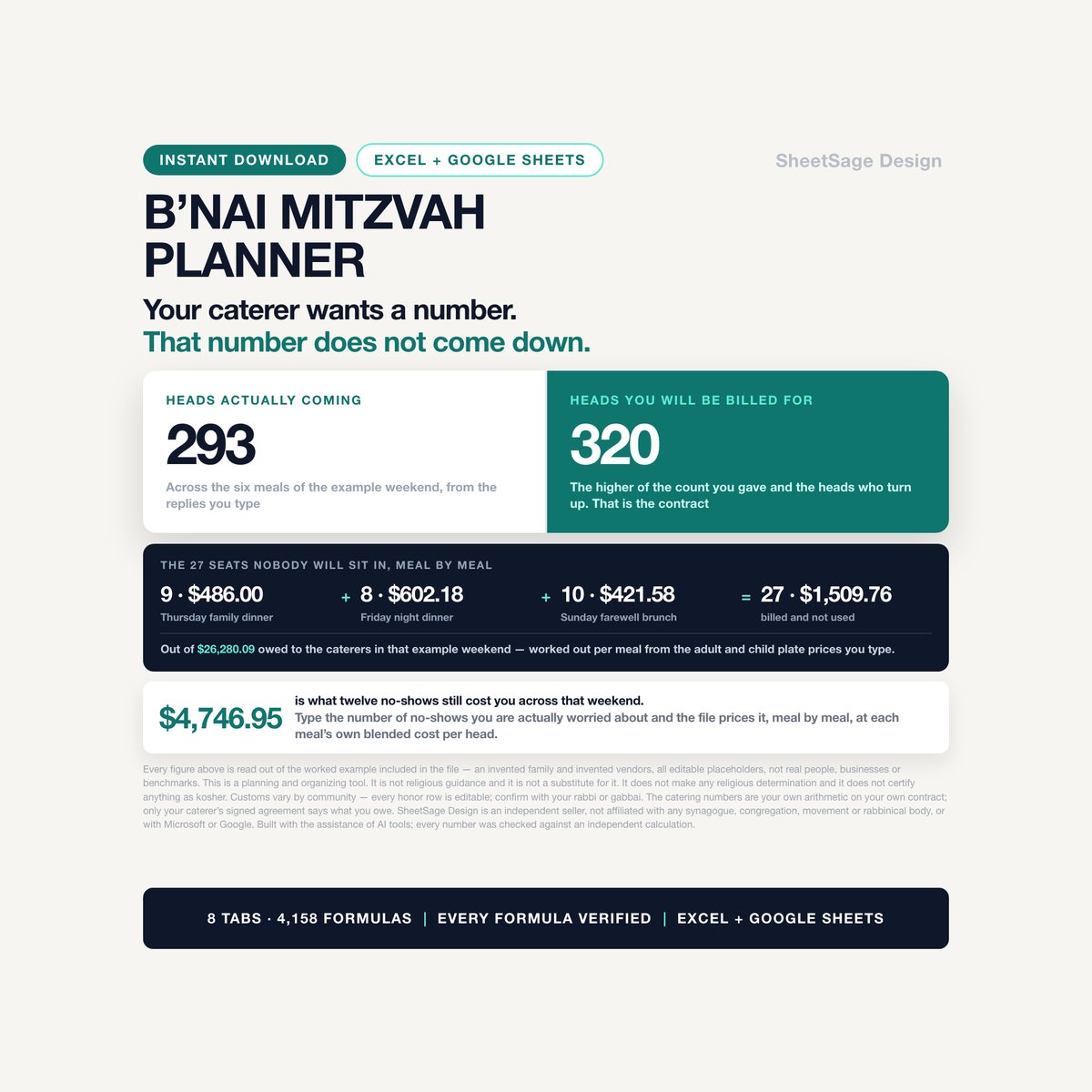
B'nai Mitzvah Planner & Catering Guarantee Calculator
Your caterer wants a number days before the party. That number does not come down.…
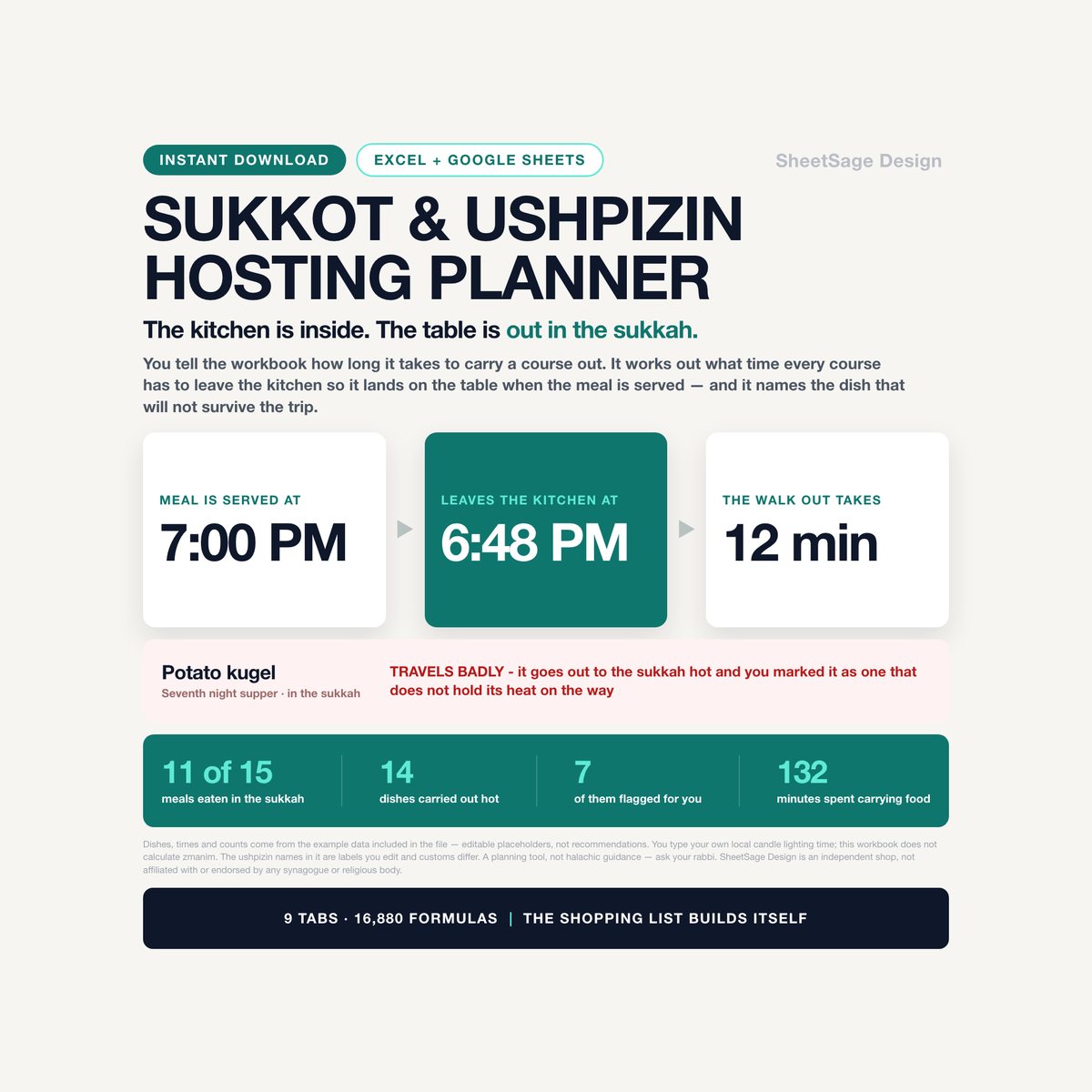
Sukkot & Ushpizin Hosting Planner
Every planner on this page gives you a blank page to write on. This one does the arithmetic.…
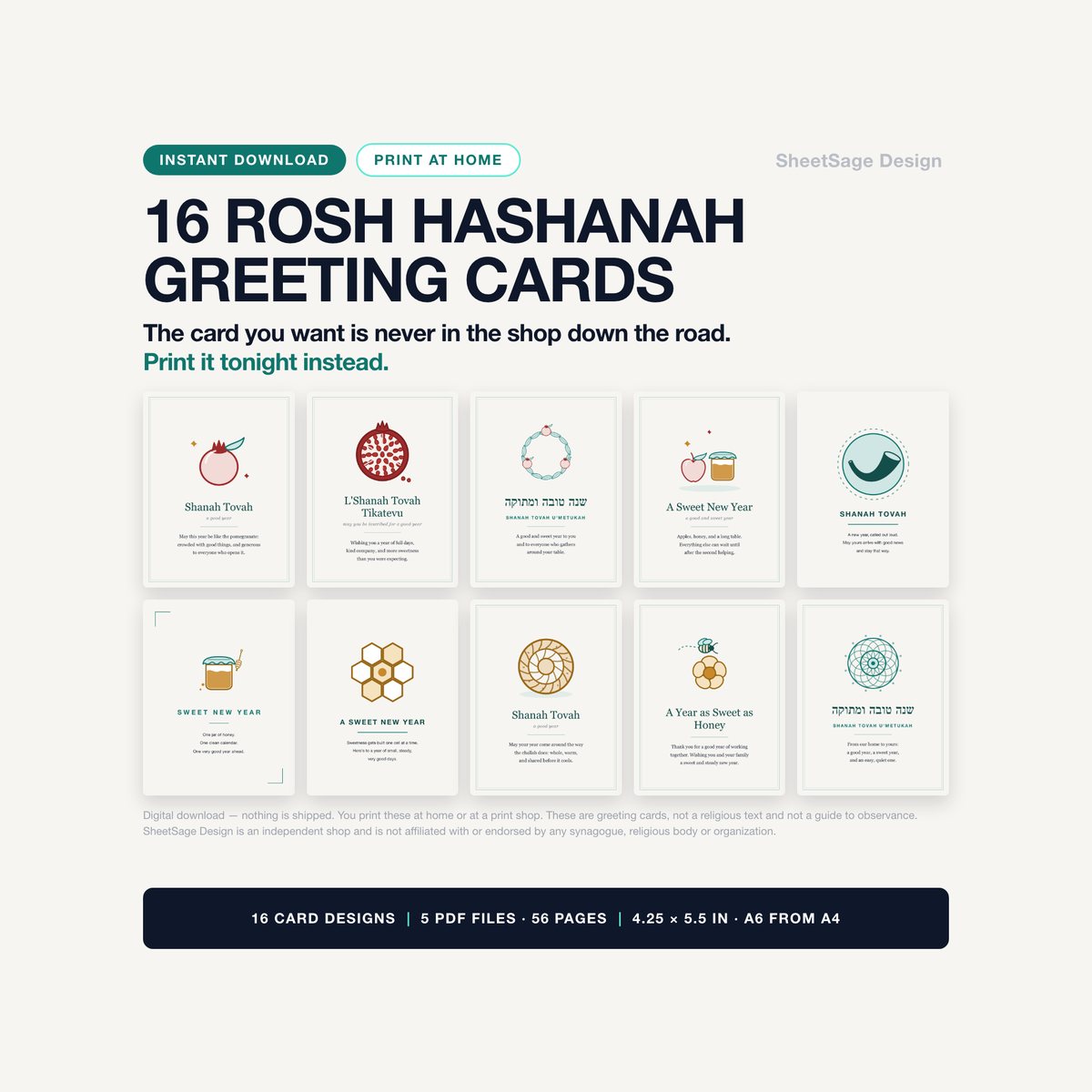
Rosh Hashanah Printable Greeting Cards — Set of 16
Sixteen original Rosh Hashanah cards, drawn by us and printed by you - tonight, if that is when you need them.…